I. Introduction
This is a Minecraft client package, written entirely in Typescript, using NodeJS node:net to communicate with Minecraft server. Currently support 26.2.
DISCLAIMER
This package is highly unstable for now, please report if there is any bug, glitch.
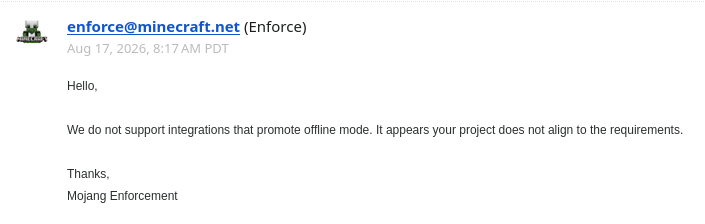
Also, since there is some problem with authenticating and appId approval, I haven't completed the join "online server" part yet. See more here
About support version:
| 26.2 | 26.3 | |
|---|---|---|
| Join server | ✅ | ✅ |
| Chat | ✅ | ✅ |
| Container | ✅ | ✅ |
| Physics | ☑️ | ❔ |
Meaning:
✅ Worked
☑️ Worked, but some of the feature not
❔ May worked, not tested
Note:
-
I haven't made the block metadata files for
26.3yet, so many block will be treated falsely :sad: -
Basically, 26.2 worked well, just some of blocks special metadata (like
bouncinessof slime block, lowfrictionof ice) isn't updated
II. Usage
Install MineJS using your favorite package manager:
npm install @vaitosoi/minejsThen write a simple code like this:
// index.ts
import { Input, Client } from "@vaitosoi/minejs";

// Init a client
const client = new Client({
    playerName: "bot", // Put your name here
    host: "localhost", // Put the server address
    port: 25565, // 25565 is the default port, change to your server's port if needed
    version: "26.2", // The client version
    loadRegistry: false, //
    // auth: { // This things is not working yet
    //     client_id: "d86254d8-edf7-4640-90eb-643c99af188e",
    //     method: "loopback",
    //     openBrowser: true,
    //     port: 12345
    // },
    // shouldVerifyMessageOrder: true,
    // shouldVerifyMessageSignature: true
});

// After initialization, start your client
client.connect();

// Listen to events
client.on("disconnect", (...args) => console.dir({ name: "disconnect", args }, { depth: null }));
client.on("disconnectRaw", (...args) => console.dir({ name: "disconnectRaw", args }, { depth: null }));
// client.on("loadChunk", (...args) => console.dir({ name: "loadChunk", args }, { depth: null }));
// client.on("unloadChunk", (...args) => console.dir({ name: "unloadChunk", args }, { depth: null }));
// client.on("spawnEntity", (...args) => console.dir({ name: "spawnEntity", args }, { depth: null }));
// client.on("updateEntity", (...args) => console.dir({ name: "updateEntity", args }, { depth: null }));
// client.on("removeEntity", (...args) => console.dir({ name: "removeEntity", args }, { depth: null }));
client.on("playerPosition", (...args) => console.dir({ name: "playerPosition", args }, { depth: null }));
client.on("message", (...args) => console.dir({ name: "message", args }, { depth: null }));
client.on("systemMessage", (...args) => console.dir({ name: "systemMessage", args }, { depth: null }));
client.on("systemMessageRaw", (...args) => console.dir({ name: "systemMessageRaw", args }, { depth: null }));
client.on("actionBar", (...args) => console.dir({ name: "actionBar", args }, { depth: null }));
client.on("actionBarRaw", (...args) => console.dir({ name: "actionBarRaw", args }, { depth: null }));

// Interact with the world
client.on("message", (message) => {
    if (!message.content.startsWith("_")) return;
    const args = message.content.slice(1).split(" ");
    switch (args[0]) {
        // Moving around
        case "w": client.hold(Input.Forward); break;
        case "sw": client.release(Input.Forward); break;
        case "ws":
            client.hold(Input.Forward);
            setTimeout(() => client.disconnect(), 2000);
            break;
        case "s": client.hold(Input.Backward); break;
        case "ss": client.release(Input.Backward); break;
        case "a": client.hold(Input.Left); break;
        case "sa": client.release(Input.Left); break;
        case "d": client.hold(Input.Right); break;
        case "sd": client.release(Input.Right); break;
        case "j": client.hold(Input.Jump); break;
        case "sj": client.release(Input.Jump); break;
        case "run": client.hold(Input.Sprint); break;
        case "srun": client.release(Input.Sprint); break;
        case "stop": client.stopMoving(); break;

        // Looking around
        case "at": {
            const [, x, y, z] = args.map(val => parseInt(val)) as [any, number, number, number];
            const state = client.getBlock(x, y, z);
            console.log(state);
            break;
        }

        // Saying words
        case "e":
        case "echo":
        case "say": {
            const message = args.slice(1).join(" ");
            client.chat(message);
            break;
        }

        // And exit
        case "disconnect":
        case "exit":
            client.disconnect();
            break;
    }
});
And run it:
npm tsx index.tsIII. API:
See documentation
IV. About joining online server:
1. What is online server and offline server:
-
Offline serveris a server you can join with a cracked account, meaning that you don't have to own Minecraft to join. -
Online server, on the other hand, require an account that owns Minecraft.
2. Why I can't join online server yet:
In order to join "online server", the client has to send some request to Minecraft server, which require an approved Azure App (more info in here and here), which I don't have at the moment. So I can not fully test the "join online server" feature right now.
3. So how do you know if the server is offline or online:
a. If you are the server owner:
Check your server.properties file:
...
motd=A Minecraft Server
network-compression-threshold=256
online-mode=false # <- false is offline, true is onlune
op-permission-level=4
pause-when-empty-seconds=60
...
b. If you are not the server owner:
- Ask the server owner
or
- Try some crack launcher to join that server
4. Note:
But still, if you somehow got an approved app and found some bug, please create a issue
P/s: They rejected me 😭